Project Girl 2 Woman

8 Best Youtube Pomodoro Timers in 2023 for You

Seriously – how do they do it?

How can some people work and study all day long getting things done and also have the time to go out, meet friends and family.

You know the people we talk about the ones that are:

  • Always on time with their projects. 
  • Achieve incredible things.
  • Volunteer
  • Learn a language “on the site”
  • Have time to learn “coding”. 
  • Work out regularly. 
  • AND still have the time to go to coffee shops, trips, and Sunday lunch with their grandparents. 

Maybe you are wondering: Why can’t I do that? 

After living with one of those high achievers I’ve realized it’s cause they use systems and schedules to work on their goals and plans. They prioritize what’s important to them. And they cut out all “unimportant” time eaters. One tool in their toolbox is the pomodoro technique. Learn about the 7 Things you should know about the Pomodoro Technique and get the free pomodoro tracker printable!

Also check the 6 best Free Offline and Online Pomodoro Trackers  that will Boost your Productivity

Today we’ll take a look at the best Youtube Pomodoro Trackers and Study with Me’s that we use as in the background while pursuing and working on our goals. Whether you only have an hour or want to work the whole day, with or without music, long or short focus time, there will be a perfect timer for you. 

Zach Highly’s 7 Hour Study with Me

Duration: 5h // With Music 🎵 // Timer: 25/5 // Winter Aesthetics

Zach Highly, a medical student,  first caught my attention with his video “how I study 70+ hours a week without burning out”. His high-quality Pomodoro Videos are pretty long. Exactly what you need when you plan a whole day of working. He usually uses Lofi Beats, which I personally find too noisy while working, but the video above only has quiet study music. Check out his channel for long-form pomodoro sessions!

The Sherry Formula Pomodoro Trackers

Duration: 3h // With Music 🎵 // Timer: 30/5 // Cottage Aesthetics

The Sherry Formula has so many great Study with Me’s with Pomodoro Trackers. It was hard to pick one. She is our absolute favorite when it comes to Pomodoro Timers. Her videos are cozy and warm. She has some videos with and without music usually between 1 and 3 hours.

The Hanoi Chamomile Pomodoro Timers

Duration: 1h // Rain Sounds// Timer: 25/5

The Hanoi Chamomile has really short 1 hour or even 25 Minute sessions for when you are short on time. They come with classical music or nature sounds.

ASMR Weekly Harry Potter Pomodoro Timers

Duration: 2h // No Music // Timer: 25/5

Want to study like Harry Potter? Try the Hogwarts themed Pomodoros!

Inner Academia a Dark Academia Pomodoro Timer

Duration: 2h // No Music // Timer: 25/5

Want a cozy rainy study day? Try this dark academia Pomodoro. Get your hot cacao ready and get started.

Study Pomodoro

Study Pomodoro offers a variety of work and break times. Depending on how focused I am I can use longer or shorter pomodoro timers. 

Study Music Project Pomodoro Trackers

Duration: 2h // Piano Music // Timer: 25/5

This one has really calm piano music in the background. The perfect timer for stressful days.

Motivate Medic Pomodoro Trackers

This one is a great find. Want to study in London? Motivate Medic has amazing Pomodoro Study With Me’s with an amazing few of London.

That`s it! Hope you found the right Pomodoro Timer to cross off your tasks! 
For our Best 10 INSPIRATIONAL YOUTUBERS check this post. Or learn about our favorite self-improvement apps in 2023 here. 

How long do you invest every day/week to hit your goals? Let us know in the comments and as always, stay productive 🙂

8 Best Youtube Pomodoro Timers in 2023 for You Read More »

Top 6  Pomodoro Timers Offline and Online that will Boost your Productivity for Free

Having a Pomodoro timer helps you stay focused on a daily basis, it helps you finish more complex tasks in small achievable steps.

Gone are the tedious cycles of procrastination and hours of guilt. 

 Yes, indeed, who would have thought that a time tracker  such as a kitchen egg is not just good for cooking or baking. Instead, you can use it to successfully  work on your goals. 

In small simple steps every day. So small that the tasks are no longer  overwhelming.There are even timers that create a claming and comfortable work atmosphere.  Good that there is technology – because you no longer have to use a kitchen timer.

Everytime one of those went off it jump scared the bejesus out of me. 

Even though a kitchen egg or a small timer is great to place on your table, there are hundreds of softwares doing the deed – and best of all: many are free and great to use: 

Don’t know what the Pomodoro Technique is? Click here to read more about THE productivity method by Francesco Cirillo.

Top 3 Online Pomodoro Timer:

Nr 3: Pomodoro by Francesco Cirillo

Nice to know: The inventor of the Pomodoro technique, Francesco Cirillo,  offers a simple online timer with quick and easy functions:

Pomodoro Timer Example 3

On the first page you can enter the name of the task you want to finish. Then you will be forwarded to this layout where you can start your 25-minute timer by clicking on “Wind up”.

On the tab you will see how much time is left for each session, and you will hear the ticking of a standard kitchen egg in the background. Of course you have the option to silence or adjust the volume of the noises in the settings.

Timer shown in tab

Nr 2: Pomofocus

Another time-management tracker found online is Pomofocus. Adapted to the Francesco Cirillo Pomodoro technique,you can create several tasks at once and also show you the finish time of all your tasks combined. Here you can set a custom time in the settings, as well as change your audio settings and intervalls.

Pomofocus Layout

Pomofocus also has the unique feature of giving you a report and ranking option. You can check how productive you’ve been during the day or week and compete with other Promofocus users:

Pomofocus Settings
Pomofocus Report
Pomofocus Ranking

Nr 1: 🚀 Pomodoro Timer

The third website we recommend you to try is this Pomodoro Timer! Like Pomofocus, you can add one or several tasks to your list and adapt the intervals based on your preferred time frame.  Compared to Nr 2 and Nr 3 Pomodoro Timer has the unique feature of music playing in the background. If you click on the three lines in the left lower corner you can choose between Lofi, Ambient and Nature sounds as well we trap remixes.

Pomofocus Music Feature

Top 3 Offline Pomodoro Timer:

In some cases we don’t have internet access, like when we choose to have a quick work session in a nearby coffeeshop or opt for a productive morning on the beach. In this case there are many useful time-management software that can help you avoid procrastination and stay on top of your to do list!

Nr 3: Alarm & Clock

Every Windows and IOS device has a standard feature called alarm or clock where you can track time. It might be a bit laborious to always change time from 30minutes to 5 minute and back, but in many devices (if not even all) you can create two timers in adnvance and launch them once the other timer went off.

Alarm Layout

For example,on my Windows computer I can create two alarms and activate them based on the phase I am in. It might be nothing special, but you don’t have to download any additional software, it can be used without a internet connection and it’s a quick solution for a busy monday afternoon. 

Click here on how to battle procrastination efficiently!

Nr 2 Focus-To-Do

Another great app that can be used offline is Focus-To-Do. Focus-To-Do is an app, downloadable on Windows (not sure if you can find it for IOS). The benefit of this app is, that you can create several tasks and projects (and add the tasks to a certain project) 

Once you’ve created a task you can start the 25 minute timer (or customized the time in the settings). Once the time is up and you’ve completed the productive phase you can see that a small clock appears next to the tasks. In addition you can see how much time you’ve invested in a task or project.

Focus To Do layout

The app also provides a report overview, where you can see how much time you spent on each  project: You can finde the button in the top right corner, right next to the golden crown.

Nr 3: Forest App

The third offline tracker for your pomodoro sessions is forest. It is one of the most popular productivity tools out there and is available for your phone, laptops and tablets, as well as a chrome browser extension.

In the Forest App you can’t note down which specific tasks you’ve completed, but you can set a custom timer. Once the time is over you will earn coins, with which you can unlock unique and special trees for your forest. Also, once you’ve passed the time successfully the selected tree will be added to your forest grounds. If you check your device for too long or too often your tree will die and yes, the dead tree will be added to your “forest”  as well. You’ll have to to start again. 

Unlocking Trees is a great way to battle procrastination, improve your performance and collect a small reward (a new tree) at the same time! 


Thats it! 

You want to create amazing goals and realize them? Then check out this life-transforming goal setting masterpost

Top 6  Pomodoro Timers Offline and Online that will Boost your Productivity for Free Read More »

7 Things you should know about the Pomodoro Technique [Free Printable]

By now I am pretty sure you’ve heard about the Pomodoro technique. I guess it is one of the most well-known time management tools out there. But, have you actually tried it before, or do you think it’s utter bulls and not worth your time? 

Let me convince you to give it a try anyways… 

Still not working for you by the end of this post? Try one of the other time management techniques mentioned below.

In a moment we’ll dive into how the Pomodoro technique works. But first, let’s take a look at how it came to be:

1. Who invented the Pomodoro Technique?

The Pomodoro technique is one of the most famous time management tools invented by the Italian Francesco Cirillo. Cirillo invented the Pomodoro technique as a student to work more efficiently. I guess he didn’t struggle with all-nighters before exams…

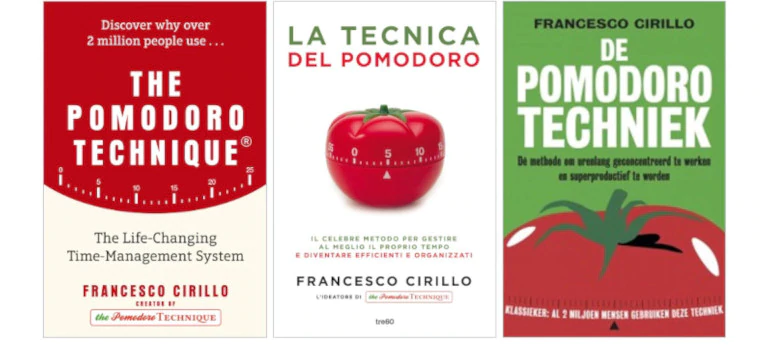
Currently, he has a consulting firm in Berlin called Cirillo Consulting. You can read more about his original idea in the book “The Pomodoro Technique”

The Pomodoro Technique the Book Cover

2. Why is it called the Pomodoro Technique?

Do you remember the tomato-shaped kitchen timers? I think every household in Germany had a kitchen timer (before smartphones came) often in the shape of a tomato. Pomodoro is the Italian word for tomato. Cirillo originally used a kitchen timer to take track of his 25/5.

At that time we had an onion-shaped one…

3. What are the 5 steps in the Pomodoro Technique?

Now that we know how it came to be, let’s take a look at how it works: 

Step 1. Chose and formulate the task you want to accomplish. 

Create a to-do list for the day. Prioritize your tasks and start with the most impactful ones.  This free Pomodoro Printable sheet can help you plan your session:

Step 2. Set the timer for 25 minutes. 

In the original Pomodoro Method, a set consisted of 25 minutes of hyperfocus work and a 3 to 5-minute break. IF your 25 minutes get interrupted that Pomodoro is void and you need to start again. Once the timer is over you MUST take the break. Nowadays there are many different variations like 50/10 45/15 or 60/25. What is your experience with the Pomodoro Method? What works best for you? 

Step 3. Work on the task.

Next, you work on the task without any interruptions. The interruptions can be internal or external.  Observe your interruptions and minimize them. 

Step 4. Take a short break.

How long should a Pomodoro break be? The original method called for a short break after 25 minutes of 5 minutes. After 4 pomodoros take a longer break of 15 to 30 minutes. 

Step 5. Repeat Steps 2-4 until you’ve accomplished your tasks.


Pomodoro Method Illustration

4. Why is a Pomodoro 25 minutes long?

  • It’s short enough to not trigger procrastination. (Read more Anti-Procrastination hacks here and here) 
  • 25 Minutes are long enough to focus. 
  • A set of 2 promodors is exactly 1 hour long so it’s a great measurement tool. ( I finished a task in X promodoros, next time I’ll need X promodoros) 
  • It creates a sense of urgency. 
  • 5-minute breaks aren’t long enough to get distracted. 
  • You can adapt the time to your personal needs.

5. What do you do in a 5-minute Pomodoro break?

It’s important that you don’t do anything brain taxing and that you do something that actually lets you rest. Here are our best recommendations for you: 

In the short breaks: 

  • Walk around. 
  • Drink a cup of water. 
  • Do some stretches.
  • Quick clean your home.
  • Jumping Jacks.  
  • Do eye exercises. 
  • Breathing exercises. 
  • Get some fresh air on your balcony or ventilate the room. 

During the long breaks: 

  • Meditate 
  • Do yoga
  • Snack on sth healthy. 
  • Take a walk. 
  • Listen to music. 
  • Draw.

6. Is the Pomodoro method effective for working and studying? Let’s see what Redditor’s have to say:

We found both pros and cons for the method. Here are some recommendations how to personalize the technique: 

7. Tips on how to use the Pomodoro Technique:

To sum it up the Pomodoro Technique is a simple Time Management tool to increase your productivity. Timewise it can also be adapted to your personal needs. It probably won’t work for all tasks, but it’s great when you need to start on a daunting task. Check out our post on:  6 Best Offline and Online Pomodoro Trackers to get started 🙂 Or use the 8 Best YouTube Pomodoro Timers instead!

What to do if the Pomodoro Technique doesn’t work for you? Let’s take a look at what other techniques like Pomodoro exist?

7 Things you should know about the Pomodoro Technique [Free Printable] Read More »

ProjectGirl2Woman
Privacy Overview

This website uses cookies so that we can provide you with the best user experience possible. Cookie information is stored in your browser and performs functions such as recognising you when you return to our website and helping our team to understand which sections of the website you find most interesting and useful.